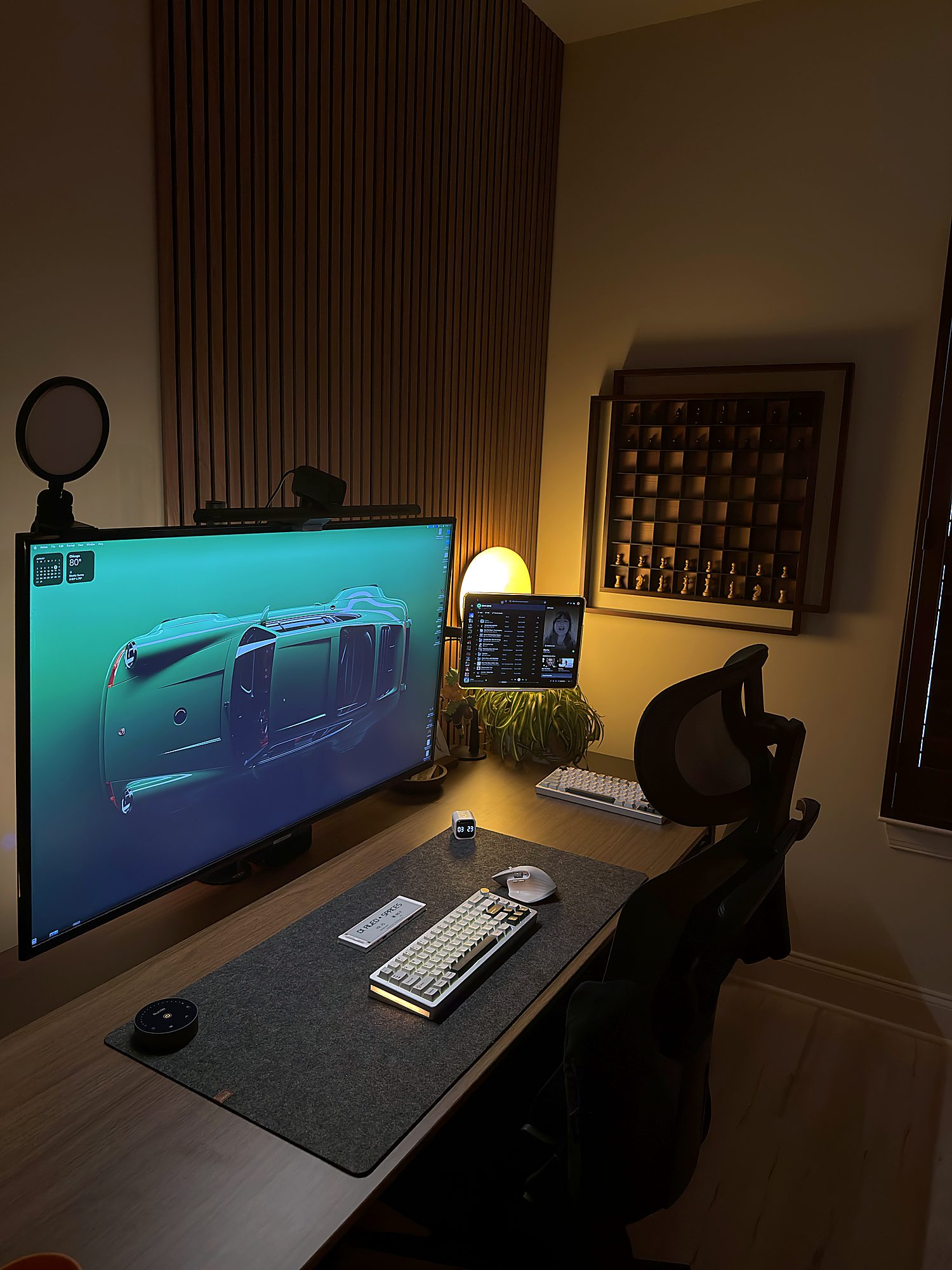
I've been working from home for the last 8 years (yes, since pre-COVID). What I've realized as someone with an 8-5 job is that it can be rewarding, but also distracting, and sometimes harder to draw a line between work and life. I've struggled with that line (and I'd be lying if I said I'm not anymore..), but the one thing I did manage to get on top of is distractions.
Part of that is because this desk has to do two completely different jobs. From 8 to 5 it belongs to a Windows laptop, a lot of spreadsheets, and more meetings than I'd like. After that it belongs to a Mac mini and to Dialed Spaces - writing, editing photos, and whatever I've decided to build that week. Almost everything on it comes back to that split, and if it didn't switch cleanly between the two it would be a mess by Tuesday.
What I learned building this room is this - if you love where you work from, you'll enjoy the work itself, and that takes care of the rest. So here's the current setup, along with all the little tools and gadgets that keep me productive during my 9-5.
The Desk: Choosing a Standing Desk That Actually Works
At this point you've heard from everyone how important a good desk is, so I'm not going into the details of that. What I'll say is this - the size matters far more than whether it raises or sits fixed. I personally like to stand for at least 3 hours a day, so I obviously gravitate towards the adjustable ones. Sturdiness matters too. A wobbly surface (standing or not) is nobody's idea of a good time, and if you're spending more than 6 hours a day there, you need to invest. Mine is the Vari - 72x30", walnut top with black legs. I bought it in June of 2026, and I must say, it's easily the sturdiest of the 3 I've owned. The 72x30 is the perfect surface area for all my needs. However, that's not the reason for me dropping $700.
The Chair: What to Look For in an Office Chair
A good chair can make or break your back (and your bank..). I've been through a few over the last 8 years of WFH, and there are plenty of brands making good ones now. The least I'd look for is solid lumbar support, a sturdy cushion, and adjustable arm rests (that last one is underrated and should not be ignored). Mine has a great seat but could hold my lower back better. It has a headrest and a coat hanger in the back (which was the seller for me bc, MEETINGS).
The Monitor: A 32" Curved QHD That Does Both Jobs
This one's the workhorse. I run a Dell 32" LED Curved QHD monitor, and it's genuinely the thing this whole desk is built around. The curve is subtle enough that you stop noticing it after a week, and QHD at 32 inches hits a sweet spot where text stays sharp without me having to scale everything up to read it. I work a lot in Word and Excel, so that sharpness truly matters.
It works so well for me for the same reason as everything else on this desk - it does two jobs. It's plugged into the laptop for my 9-5, and then it becomes my monitor for Dialed Spaces after 5pm. One cable, one screen, two completely different modes.
Am I planning to replace it eventually? Yes (I've had my eye on a 45 or 49 inch for a while now), but honestly there's no rush. For now this is my productivity machine and it hasn't given me a single reason to hurry.
Running a Work Laptop and a Personal Mac on One Desk
I use a Windows laptop for my 9-5, and the awesome Mac mini M4 for Dialed Spaces. The work machine is docked and mounted underneath, so it never sits on the surface at all, and honestly that one change did more for how this space feels than half the gadgets on it. An open laptop eats room, throws heat, and adds a third screen I rarely look at. And the part I didn't expect - it never stops looking like work. Putting it away means 5 o'clock finally feels like something.
The Mac mini is the machine I actually enjoy using. It sits out of sight too, it is silent, and it doesn't complain no matter what I throw at it - photo edits, video, and all the tinkering I do for Dialed Spaces after hours. If you've been on the fence about the M4 mini because it seems too small to be a real computer, it isn't. I've had zero moments where I wished I'd bought something bigger.
A few things I'd tell any Mac user to do, because they took me embarrassingly long to figure out. Turn on Stage Manager or at least learn the Mission Control gestures properly - once you stop hunting for windows you get a surprising amount of time back. Set up Hot Corners (mine locks the screen bottom-right, which matters when you work from home and the doorbell goes). Use Spotlight for everything instead of clicking around, and if you want to go further, replace it with Raycast. And Sidecar turns an iPad into a second display in about 4 seconds with no cables, which is exactly how mine ended up on this desk.
Using an iPad as a Second Monitor
I have the iPad Air 13, and it does two completely different jobs depending on what I'm working on. During my 9-5 it plays YouTube off to the side (which sounds like the opposite of productive, but is genuinely how I get through spreadsheets). When I'm on the Mac it becomes a second monitor over Sidecar, and that's where everything I need to see but not touch ends up - notes, a reference, whatever I'm following along with. It cost me nothing extra because I already owned it, which makes it the best value thing on this desk by some distance.
Best Keyboard and Mouse for a Productive Desk Setup
The mouse is the Logitech MX Master 3S, and I've had it for 3 years now, which should tell you most of what you need to know. It's a productivity beast. The horizontal scroll wheel is the thing that justifies the price on its own. If you live in wide spreadsheets like I do, nudging sideways with your thumb instead of dragging a scrollbar changes how the work feels. The main wheel switches into a free-spin mode that just keeps going (if you've never used one, it's hard to explain how much better this is for long documents). And you can customize the whole thing in the Logitech app - I have mine set up to switch between windows, which I now do dozens of times a day without thinking about it.
For the keyboard I run two, and they're siblings. On the Mac I use the Yunzii AL66, a 65% board, and it's amazing to type on. The Windows side gets its bigger sibling, the AL80. Same feel, slightly different layout, and having the arrow keys and a few extras on the work machine turns out to matter more than I expected (spreadsheets again). Both are thocky rather than clicky, which is the difference between a keyboard you tolerate and one that makes you want to sit down and start.
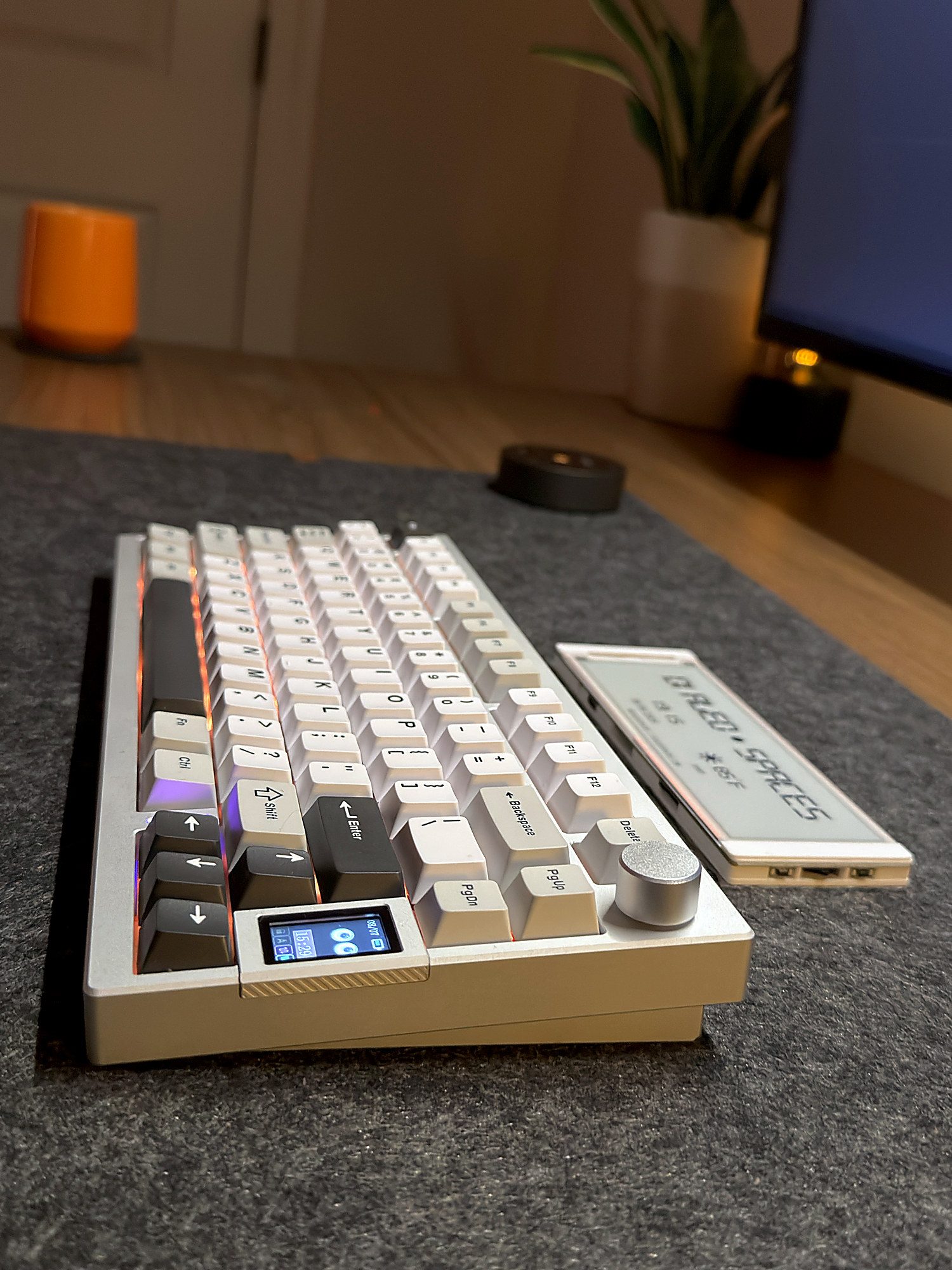
I resisted mechanical keyboards for a long time because I assumed the whole thing was aesthetic - people liking the sound, the hobby of it. It is not only that. I type more accurately, and above all I'm far readier to sit down and begin. That's hard to put a number on and it's still true.
A Physical Pomodoro Timer for Focus
This is the least technical thing on my desk and probably the one I think about the most. It's a physical cube - you turn it over to the time you want and it starts running. That is the whole interaction. When you work a 9-5 with meetings scattered through the day, the hard part is not finding hours, it's protecting the ones you have. And yes, obviously you can do this on your phone (I did for a long time), and it never worked as well. A cube you pick up and turn over is a decision you've made. An app you tap is a notification you'll swipe away in an hour. I don't have a better explanation than that but the difference has been real.
Monitor Light Bar and Desk Lighting for Eye Strain
I use the Quntis light bar and I'll be honest, this was the last thing I bought and it should have been one of the first. It sits on top of the display and throws light down onto the desk instead of into the screen, and if you've ever worked past sunset and wondered why your eyes hurt, this is why. The whole thing runs off a little puck that sits on the desk, so changing the brightness is a dial you turn and not a button you go hunting for behind the monitor. Mine also has a sensor that shuts the light off when I walk away and brings it back the moment I sit down (sounds like a gimmick, and then you realize you've stopped thinking about it entirely).
A 4K Webcam for Working From Home
The Anker 4K, and this one is easy. I'm on video calls most of the day, so at some point I got tired of showing up looking like a potato (you know the look) and just bought a proper camera. It's sharp, it handles the lamp light in my room well, and honestly I haven't touched a setting on it since the day I plugged it in. That's as much as I can say about a webcam without making things up.
Desk Cable Management: Getting Everything Out of Sight
This is the part that took the most effort and gets the least credit. Every cable on this desk is hidden and none of it happened by accident. The work laptop is mounted under the desk, so that cable never comes over the top at all. The Mac mini sits on the back of the monitor arm, which honestly is one of my favourite things about this setup - it's a whole computer and you can't see it. And the rest goes into cable trays underneath, which just stick on (the adhesive comes in the pack, no drilling, no screws, took about 10 minutes).
Here's why I think this matters more than it sounds like it should. You don't notice cable management when it's done - you just walk into the room and it feels calm. You absolutely notice when it isn't, even if you couldn't tell someone why. Three cables hanging off the back edge reads as unfinished no matter how good the gear on it is, and that's genuinely the difference between a desk you want to sit at and one you put up with.
If you're starting from a mess, the order that worked for me was this - get the computers off the surface first (mount them, they're lighter than you think), then sort out power, and tidy up whatever is left with trays. Doing it all in one go is how you end up giving up halfway.
Charging Station and Power on the Desk
This is the Anker retractable charger and it's one of those things I didn't know I needed until I had it. Two USB C cables pull right out of the body and snap back in when you're done, so nothing is permanently coiled up on my desk waiting to annoy me. It charges fast, there are 3 outlets and a couple more ports around the back for when both cables are already busy, and there's a tiny screen on the front showing exactly how much power everything is pulling (completely unnecessary, and my favourite part). Do I need to know that? No. Do I look at it every single day? Also yes.
How to Personalize Your Desk Setup
Here's the part I actually care about, and the part most setup posts skip right past. Productivity has a lot to do with aesthetics too. You can put every gadget on this list on a desk and still not want to go sit at it, and I've had setups like that (technically great, and I'd find any excuse not to be there). So make the desk for you. Personalize it!
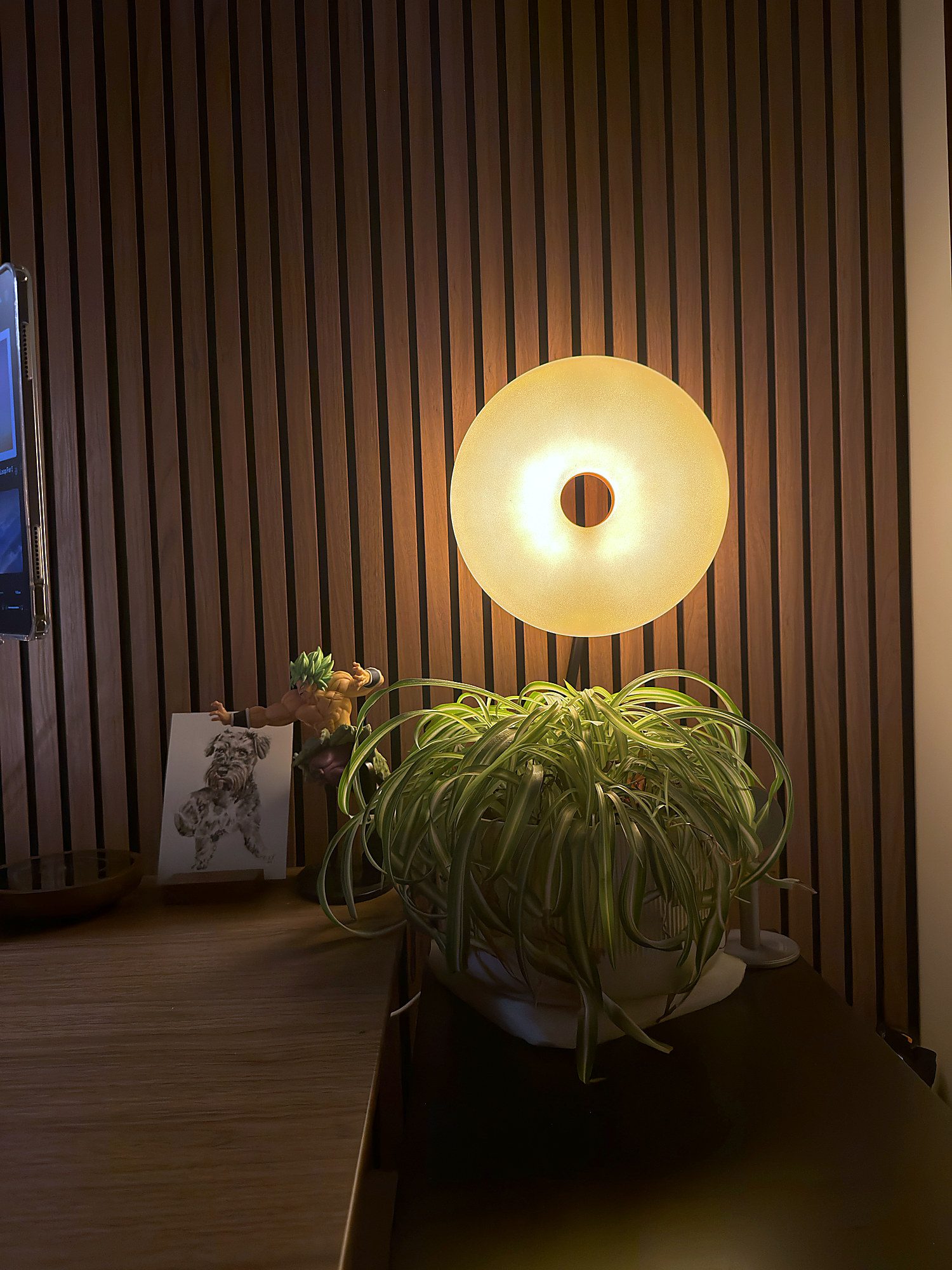
For me that's a charcoal felt mat, a plant, and a lamp that doubles as a diffuser so the whole corner goes warm at night instead of feeling like an office. My Brolly figurine sits on one side, and next to it a sketch of my dog, the best boy ever. The monitor and the iPad are both on arms rather than stands, which gets everything off the surface and honestly is half the reason the desk looks the way it does.